Templates
Twelve curated integration templates. Pick one, configure it, sync.
No drag-and-drop canvas. No node graph. Each template ships with sensible defaults for the source filter, target endpoint, and starter field mapping — you adjust the bits that are specific to your shop and save.
v1 templates · CounterPoint ↔ Shopify
What ships at launch.
Filter by direction, or browse the full set. The direction filters multi-select — click two or more to combine. Additional templates and destination platforms (BigCommerce, accounting, marketplaces) will follow in subsequent releases.
Sync products
Push catalog, prices, descriptions, and images from CounterPoint to Shopify. Filtered by ECOMM_FLG so only your web-eligible items go online.
Sync inventory
Real-time stock-level updates across all enabled SKUs. Inventory changes on CP appear on Shopify in seconds.
Pull online orders
New Shopify orders land in CounterPoint as PS_DOC tickets within seconds, ready to post and fulfill from the back office.
Sync customers
Keep AR_CUST and Shopify customer records aligned both directions, with per-field conflict rules and quarantine review.
Sync gift cards
Issue and redeem the same balance from POS and online. No more "online gift cards only redeemable in-store" limitations.
Sync collections
Map CounterPoint categories and subcategories to Shopify collections automatically. Re-categorize once in CP, see it on the storefront.
Sync product images
Push CP item images directly to Shopify product galleries. Add or replace images in CP and they appear online.
Sync vendor brands
CounterPoint vendors become Shopify brands or vendors automatically. Maintain your supplier relationships in CP, surface them online.
Pull customer registrations
New customer signups on Shopify create AR_CUST records in CounterPoint, ready for in-store recognition the next time they walk in.
Sync sale prices & promotions
Promotional pricing and sale events configured in CounterPoint flow to Shopify with their start and end dates intact.
Sync loyalty balances
Loyalty points earned in-store and online stay aligned. Customers see the same balance whether they're shopping at the counter or on the web.
Pull abandoned carts
Web abandoned-cart events flow into CP custom fields, ready for re-engagement campaigns or follow-up calls from your sales team.
From pick to live
What configuration actually looks like.
No engineers required. No node graphs. The actual product UI you'll be using once you sign up.
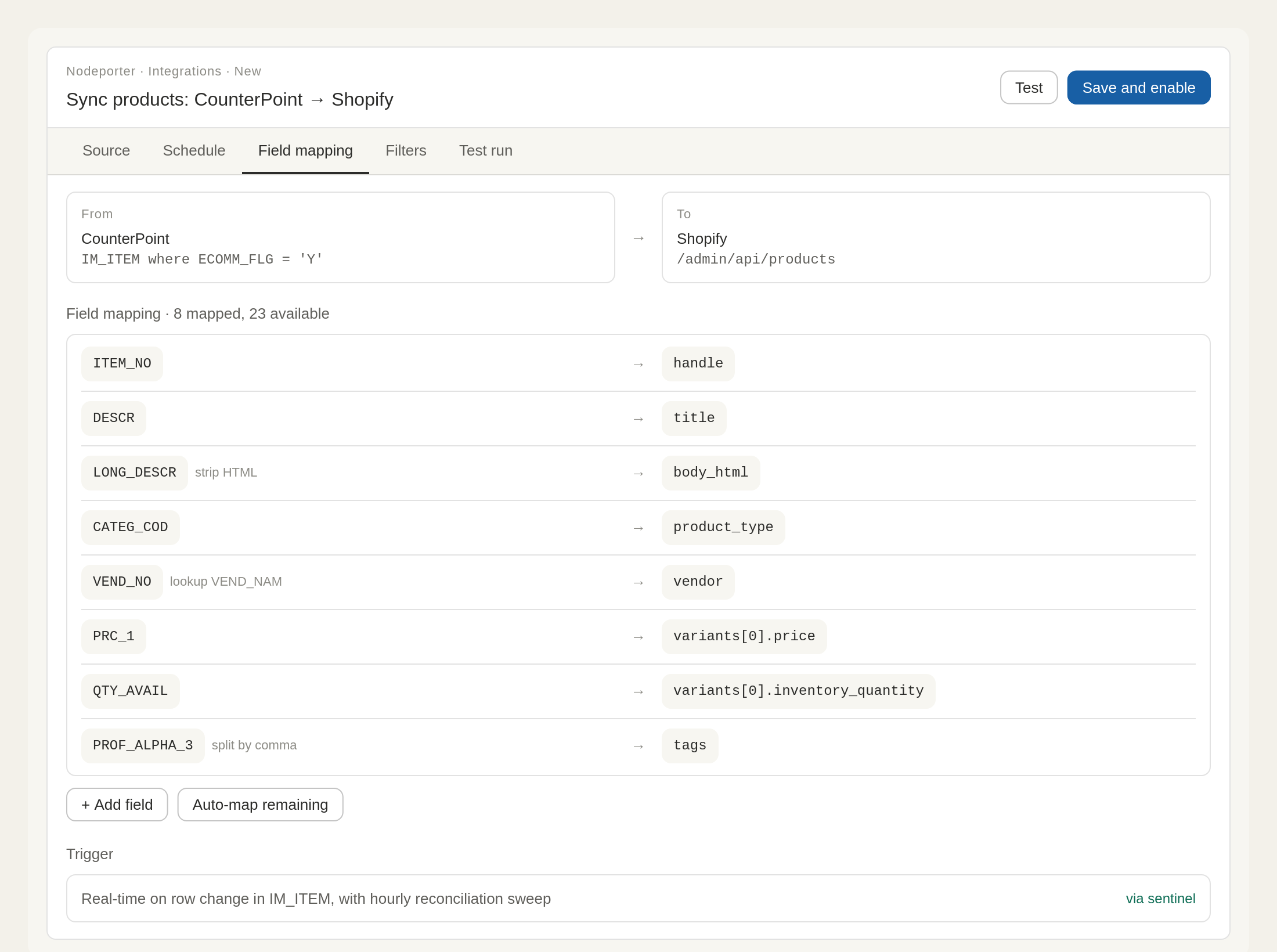
Configuration
Map fields, set transforms, save.
Each row is a triple: source field → optional transform → target field. Inline transforms include strip-HTML, vendor lookup, e.164 phone formatting, and split-by-delimiter — chosen from a dropdown, no code.
"Auto-map remaining" handles the obvious mappings using built-in heuristics. Most customers click it, review, and save.
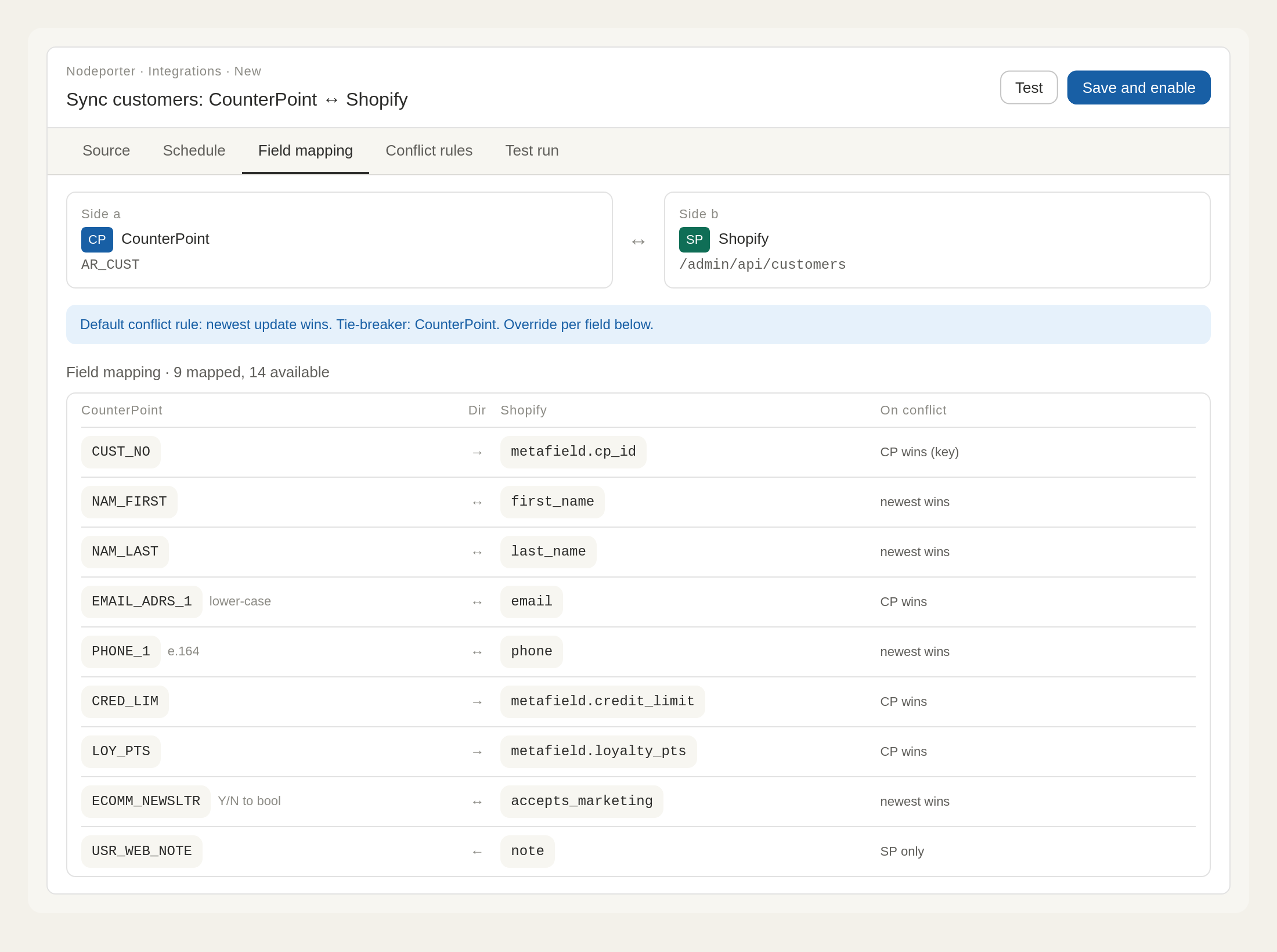
Bidirectional templates
Per-field direction and conflict rules.
Bidirectional templates add a direction column (→ ↔ ←) and a conflict-winner column per field. The default conflict policy is set once at the top — individual fields override only where it matters.
When CP and your destination both update the same record at the same time, ambiguous cases are quarantined for your review. Never silently overwritten.
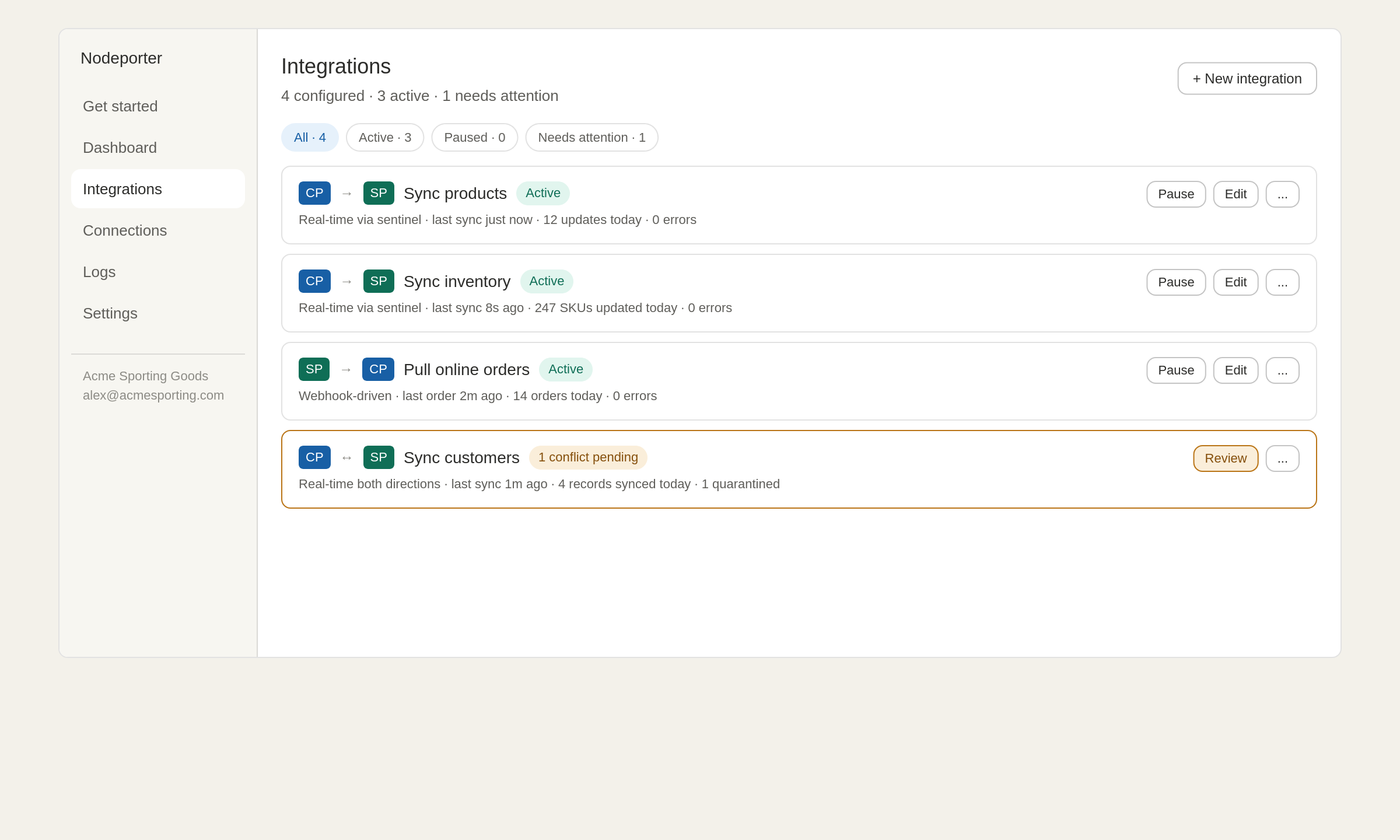
Live monitoring
Real-time sync, monitored from one dashboard.
From the moment you save, the integration is live. Each card surfaces last-sync time, today's record count, and any conflicts that need your review.
Filter by status (Active, Paused, Needs attention) when you have many integrations running. Click any card to drill in.
Configuration tabs
How a template becomes a live sync.
Each template lands you on the same five-tab configuration screen. Most customers click "Auto-map remaining," review the field mappings, and click Save.
Source
Where the data comes from. Pre-set to the right CP table and a sensible filter. Adjust if your shop's customizations require something different.
Schedule
Real-time, scheduled, or webhook-driven. Real-time is the default for templates that support it.
Field mapping
Source field → optional transform → target field. Auto-map populates the obvious ones; you tweak the rest.
Filters
Add additional source filters beyond the template default — only sync items above a certain margin, exclude a specific category, etc.
Test run
Dry-run mode shows exactly what would be sent to Shopify without actually sending it. Review, fix, then save and enable.
Conflict rules
For bidirectional templates only. Per-field conflict winners (newest wins, CP wins, destination wins) plus a quarantine policy for ambiguous cases.
Be among the first to use Nodeporter.
Join the waitlist for founding-member pricing and early access when we launch.